# For example, here is a list of numbers
numbers = [1, 2, 3, 4, 5]

print(numbers)Fundamentals Loop
Module 1: Python Fundamentals
Fundamentals: Looping in Python
For loops are a fundamental tool in programming. They allow us to iterate over the elements of a list.
Before introducing the loops, let us see two other Python elements: lists and print. Both will be expanded upon in future lessons, but will be useful now to work with loops.
What is a List?
In programming, we often work with collections of data. One common way to handle collections is by using lists. A list is an ordered collection of elements. These elements can be numbers, strings, or any other data type.
We will explain lists in detail later on this course. For now, it is enough for us to know that we can create lists using the brakets [], and that lists can contain any kind of variable (numeric, string, boolean…).
mixed_list = [1, "b", True, 4]

print(mixed_list)
For Loops
For loops are a fundamental tool in programming. They allow us to iterate over the elements of a list.
The structure of a For loop is:
for <element> in <list>:
  <code>
The loop will executive its <code> for each one of the <element> in the <list>.
For instance, let’s say we have a list of numbers, and we want to print each number:
numbers = [1, 2, 3, 4, 5]

for num in numbers:
  print(num)
See that the code inside the loop does not even need to use the elements we are iterating over:
numbers = [1, 2, 3, 4, 5]

for num in numbers:
  print("I do not care about the number")
But what if we want to print the numbers from 1 to 100?
Using range() with For Loops
Python provides a built-in function called range(<start>, <stop>) that generates a sequence of numbers from <start> to <stop> but not including the last number. You can use range() in for loops to iterate over a range of numbers.
For example, let’s print the numbers from 1 to 100 using range():
for num in range(1, 101):
  print(num)
We can just write range(<stop>) too and it will start in 0:
for num in range(101):
  print(num)
And even specify the stride (step between values) with range(<start>, <strop>, <stride>):
for num in range(1, 101, 3):
  print(num)
Exercise
Write a program to compute the factorial of any number.
\[5! = 5 \cdot 4 \cdot 3 \cdot 2 \cdot 1\]
num = 5

# Initialize the result
result = 1

# Loop from 1 to the number (included)
for value in range(1, num + 1):
  # Update result by multiplication
  result = result * value

print(result)
Updating Variables in For Loops
Many times when we work with loops, we want to update one of our variables. Remember variables can be reassigned.
For instance, lets make a sentence out of a list of words:
list_words = ["Hello", "my", "name", "is", "Daniel"]

# We initialize the output variable
# In this case, it will be an empty string
sentence = ""

# This code will add words to the sentence
for word in list_words:
  # The word is added to the sentence
  sentence = sentence + word
  print(sentence)
Exercise
How would you add spaces to that sentence?
Nested For Loops
We can include a loop inside another.
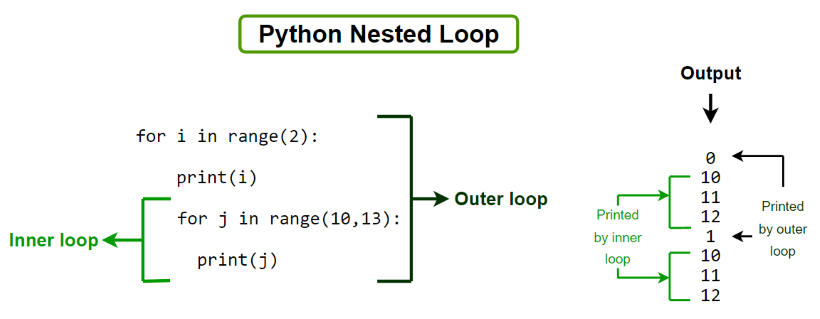
Exercise
What is the output you expect from this loop?
for number in range(3):
  for letter in ["a", "b", "c"]:
    print(number, letter)
Flow Control inside For Loops
We can also combine IF clauses and for loops:
for number in [-2, -1, 0, 1, 2]:
  if number < 0:
    print(f"{number} is negative")
  else:
    print(f"{number} is zero or positive")
Exercise
Write a code that finds all factors of any given number.
A factor is a number that divides the given number without any remainder.
num = 52

for factor in range(2, num):
  if (num % factor) == 0:
    print(f"{factor} is a factor of {num}")
Skipping One Iteration in a Loop
The command continue will stop the current iteration of the loop and jump to the next one.
for <element> in <list>:
  <code1>
  if <condition>:
    continue
  <code2>
In the sample structure above, the loop will always execute <code1>. Then, if <condition> is met, will jump to the next <element> and skip <code2>.
for num in range(5):
  # This always happens
  print(num)
  # If the number is 2, we skip the next part
  if num == 2:
    continue
  # This happens for all numbers except 2
  print(f"{num} x 2 = {num * 2}")
Exercise
Read the code below and, without running it, guess what messages will be printed.
for n in range(1, 10):
  sqn = n ** (1/2)
  if sqn % 1 == 0:
    continue
  print(n)
Stopping Loops Early
The command break will stop the For loop. We usually use it in combination with an IF clause.
for <element> in <list>:
  if <condition>:
    break
  <code>
In the structure below, the loop will stop once the <condition> is met. Else, it runs the <code> as usual.
for number in range(10):
  if number > 5:
    print("Stop!")
    break
  print(number)
Notice that break only stops one loop. When working with nested For loops, breaking an inner loop will not stop the outer one.
for number in range(5):
  for letter in ["a", "b", "c"]:
    print(letter)
    if letter == "b":
      # This break only stops the loop of "letter"
      break
Exercise
Write a program that gets list of numbers and calculates the sum of these numbers until the sum equates or exceeds a certain threshold (e.g., 100). It prints a message with the result and the number where it stopped.
list_numbers = [1, 3, 4, 5, 7, 9]
threshold = 10

# Initialize the result in 0
result = 0

# Loop through the list of numbers
for number in list_numbers:
  # Update the result
  result = number + result
  # Check if the result reached the threshold
  if result >= threshold:
    print(f"Stopped at {number}. Result is {result}")
    break

print(result)
Exercise
Fix the following cells of code.
# Multiply all odd numbers until the result is higher than "n"
n = 1000
result = 0

for i in range(n):
  if i % 2 == 1:
    result = result * i
  if result > n:
    break

print(result)
While Loops
In addition to for loops, there’s another type of loop called a while loop. A while loop repeatedly executes a block of code as long as a condition is True.
while <condition>:
  <code>
# Let's use a while loop to count from 1 to 5
num = 1
while num <= 5:
print(num)
num = num + 1
Exercise
Write a program that gets list of numbers and calculates the sum of these numbers until the sum equates or exceeds a certain threshold (e.g., 100). It prints a message with the result and the number where it stopped.
list_numbers = [1, 3, 4, 5, 7, 9]
threshold = 10

# Initialize the result in 0
result = 0
# Initialize the list index in 0
index = 0

# Loop through the list of numbers
while result < threshold:
  # Update the result
  result = list_numbers[index] + result
  # Move the index forward
  index = index + 1

print(f"Stopped at {list_numbers[index]}. Result is {result}")
Bear in mind that, if the condition never updates, the While loop will run forever! If you run into this case, you can stop the execution by clicking on the “stop” button at the left of the cell.
num = 1

# This loop will never end
while num > 0:
  num = num + 1
  print(num)
Exercise
Read the following problems and answer: would you use a FOR loop or a WHILE loop?
Calculate the sum of the first 50 even numbers.
List the first 20 terms of the Fibonacci sequence.
Find the first number in the Fibonacci sequence that is higher than 999.
Print all the multiples of 5 between 1 and 100.
Find the first 10 prime numbers.
Continuously divide a number by 2 until the result is less than 1.
Compute the sum of the digits of a number until the sum becomes a single-digit number.
Generate and print the first 15 square numbers (1, 4, 9, 16, …).
Answer.
You know exactly how many even numbers you need (50), so a FOR loop is suitable.
The number of terms is fixed (20), making a FOR loop appropriate.
You don’t know how many iterations it will take to reach a number greater than 999, so a WHILE loop is more suitable.
The range of numbers (1 to 100) is fixed, so a FOR loop is ideal.
You need exactly 10 primes, so a FOR loop is suitable for counting up to 10.
The number of divisions needed is not predetermined, so a WHILE loop is best.
You do not know how many times you will need to sum the digits, so a WHILE loop is appropriate.
The number of square numbers is fixed (15), making a FOR loop ideal.
Now try to code those exercises on your own! Feel free to use Gemini if you get stuck.
# Code the exercises
Exercise
Why are the following WHILE loops never ending?
i = 1
while i != 0:
  print(f"The value of i={i} is not zero.")
  i += 1
n = 2
while n % 2 == 0:
print(f"n is still even: {n}")
n = n * 2i = 1
while i > 0:
i = i // 2
print(f"i is now: {i}")
i += 1