x = 10
print(f"x is a {type(x)}")

y = 2.72
print("y is a", type(y))

s = "Hello world"
print("s is a", type(s))

print(type(False))
print(type(print))Fundamentals Functions
Module 1: Python Fundamentals
Functions: Introduction
In mathematics, a function is a concept that maps inputs to outputs. For instance, consider the function \(f(x, y) = x + y\), which takes two inputs, x and y, and produces an output, z.
\[z = f(x, y) = x + y\]
However, in programming, functions are a versatile and fundamental concept that goes beyond this mathematical definition. Functions in programming are self-contained blocks of code designed to perform specific tasks or groups of related tasks.
Built-in Functions in Python
Python, like many programming languages, provides both built-in and user-defined functions. Built-in functions are ready-made functions that come with Python. A good example that we have been using from the very start is print().
The type() function either returns the type of the object or returns a new type object based on the arguments passed.
int(<x>) converts a value to a integer.
pi = 3.1415
print("pi is a", type(pi))

pi_new = int(pi)
print(f"We converted {pi} to {pi_new}")
print("pi_new is a", type(pi_new))
⚠ int will always round down!
x = 5.9999

print(f"Input number:   {x}")
print(f"Using f-string: {x:.0f}")
print(f"Using int:      {int(x)}")
int can be used to convert string to numbers.
x = "12"  # This is a string
y = int(x) # This is an integer

print(y * 2) # We can operate with it now
⚠ int fails when the input contains anything other than a number.
s = "Hello"

print(int(s))
This includes periods . so be careful when converting from string to integer!
s = "3.14"

print(int(s))
float(<x>) converts a value to a float. Contrary to int, float allows periods inside strings.
s = "3.14"
print(s)
print(type(s))

new_s = float(s)
print(new_s)
print(type(new_s))
# Can `float()` perform operations?
s = "5 / 2"
print(float(s))round(<x>, <decimals>) rounds a numeric value to a given amount of decimals.
x = round(3.1415, 2)

print(x)
<decimals> can be 0 (we round to the closest integer) but the output will still be a floating number.
x = 5.9999

print(f"Input number:   {x}")
print(f"Using f-string: {x:.0f}")
print(f"Using int:      {int(x)}")
print(f"Using round:    {round(x, 0)}")
abs(<x>) returns the absolute value of <x>.
x = abs(-5)

print(x)
str(<x>) converts a value to a string.
x = 10
print(type(x))

s = str(10)
print(type(s))
len(<s>) returns the length of a string.
# Remember, spaces do count
print(len("a b"))
# In the example above:
# "a" is the element 0
# " " is the element 1
# "b" is the element 2
# `len()` will return 3 (there are three elements)print(len("There is fun in functions"))# `len()` can be used to count the number of digits in a number
x = 76875675474657
print(len(str(x)))The input Function
The input(<message>) function in Python is used to collect data from the user via the keyboard. It allows your program to pause and wait for the user to enter some text, which is then stored as a string.
x = input("Give me a number: ")

print(f"Your number is {x}")
# `input` always returns a string
x = input("Give me a number: ")
print(type(x))What should we do to collect the user input as a numeric variable?
number = input("Give me a number: ")
# Convert the number to integer
number = int(number)

if number % 2 == 0:
  print("Your number is even")
else:
  print("Your number is odd")
Exercise
Without running the code, what will be the output?
x = int(input("Give me a number: "))

# Multiply the number times 8
print(x * 8)
We can use several input statements in the same code. Just make sure that the variable stored has a different name.
x = float(input("Give me a number:       "))
y = float(input("Give me another number: "))

print(f"{x:.0f} x {y:.0f} = {x * y:.0f}")
These functions are part of the Python Standard Library, a collection of modules accessible to Python programs without the need for external code installation. The Python Standard Library simplifies programming by offering commonly used commands, reducing the need to reinvent the wheel.
To use functions from the standard library, you can import the specific module at the beginning of your script. In the upcoming sections, we’ll explore some essential Python modules.
User-Defined Functions
In Python, functions are created using the def keyword. They serve as reusable blocks of code that perform specific tasks. User-defined functions offer an effective way to encapsulate a sequence of statements into a single, reusable unit of code.
The def keyword marks the beginning of a function definition, followed by the function’s name. Functions in Python can take zero or more arguments, which are values or data that the function operates on.
def <function_name>(<argument>):
  <code_of_the_function>
User-defined functions play a vital role in structuring and organizing code, enhancing modularity, and simplifying code maintenance.
Example. Program a function that greets any user by name.
# Example of a simple function
def greet(name):
  # This functions says hello
  print(f"Hello, {name}!")

# This cell does not output anything, but after you run it,
# Python will have the function `greet()` in memory!greet("Jorge") # Output: Hello, Jorge!greet("Ana")Example. Program a function that takes any number and prints its multiplication table from 1 to 10.
def multiplication_table(x):
  for n in range(1, 11):
print(f"{x} x {n} = {x * n}")multiplication_table(3)multiplication_table(8)Positional Arguments in Python Functions
In Python, functions can accept arguments, which are values or data provided to the function to perform a specific task. Positional arguments are one type of argument, and they are passed to a function based on their position in the function call.
def <function_name>(<argument_1>, <argument_2>):
  <code_of_the_function>
  return <output>
Positional arguments must be passed to the function in the same order as they are defined in the function’s parameter list. This means that the first argument provided corresponds to the first parameter in the function definition, the second argument corresponds to the second parameter, and so on.
Example. Program a function that takes a student’s name and their grade, then says if they passed or not.
def check_pass(name, grade):
  if grade >= 5:
    print(f"{name} has passed!")
  else:
print(f"{name} has failed")check_pass("Luke", 8)check_pass("Yoda", 2)# Careful with the order of the input arguments
check_pass(6, "Leia")
Exercise
How would you improve the function check_pass() above, so that it does not raise an error when the input arguments are not the right type?
def check_pass(name, grade):
  # Check "name" is a string
  if type(name) != str:
    print("Name must be a string")
    return
  # Check "grade" is an integer
  if type(grade) != int:
    print("Grade must be an integer")
    return
  if grade >= 5:
    print(f"{name} has passed!")
  else:
    print(f"{name} has failed")
Exercise
Without running the code, guess the output of the cell below.
def addition(x, y):
  print(x + y)

addition("hi", "oh")
Example. Program a function that takes the coordinates of two points in a 2D space and prints the distance between them.
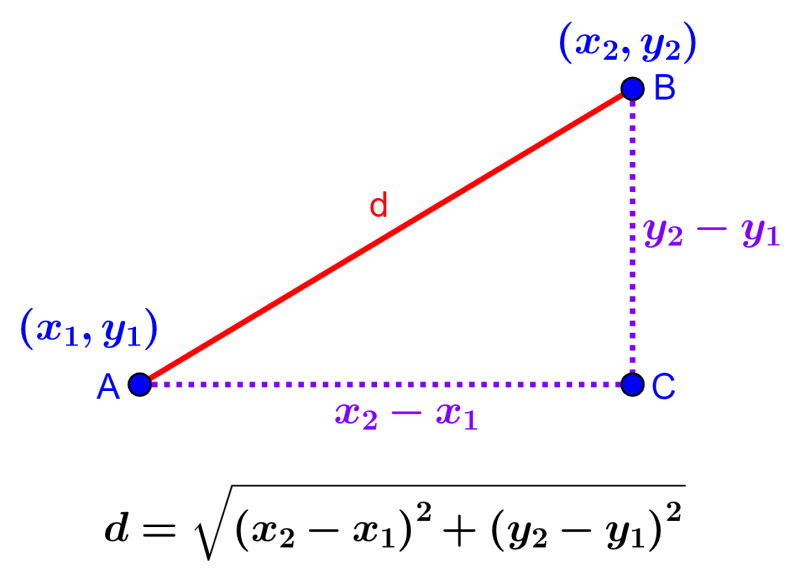
def distance_2d(x1, y1, x2, y2):
  width = x2 - x1
  height = y2 - y1
  d = (width**2 + height**2)**(1/2)
  print(f"The distance between ({x1}, {y1}) and ({x2}, {y2}) is {d:.2f}")

distance_2d(1, 3, 5, 4)distance_2d(1, 1, 2, 2)
distance_2d(2, 2, 1, 1)
distance_2d(1, 2, 1, 2)Return Output in Python Functions
Python functions can also provide results (outputs) via the return command. You can save function’s outputs in variables for later use.
def <function_name>(<argument>):
  <code_of_the_function>
  return <output>
Lets see the difference between print() and return.
A function that uses print()
def add_print(a, b):
  print(a + b)
# When we run this cell, the function "add_print()"
# calls the "print()" and Python shows the message to us
result = add_print(3, 2)# What happens when we print(result)?
# We get "None", because the function "add_print()"
# do not return any value!
print(result)A function that uses return
def add_return(a, b):
  return a + b
# When we run this cell, the function "add_return"
# computes the result and returns it as a value
result = add_return(3, 2)
# No print() function has been called yet,
# so Python does not show anything to us# The result has been stored and printing it will show the value
print(result)Example. Write a function that computes the difference between two numbers.
def difference(a, b):
  y = a - b
  return y
z = difference(3, 2)
print(z)Example. Write a function that takes any number and computes its square root.
def square_root(x):
  return x**(1/2)
n = square_root(9)
print(n)# We can apply the function multiple times
n = square_root(square_root(27))
print(n)x = 16
# We store the output into variable `y`
y = square_root(x)
print(f"The square root of {x} is {y}")Example. Write a Python function to get a substring with the odd index characters.
def odd_index_chars(text):
  return text[1::2]

print(odd_index_chars("abcdefg"))
Example. Write a Python function that calculates the sum of the squares of all integers from 1 to n.
def sum_of_squares(number):
  result = 0
  for x in range(1, number + 1):
    result = result + x**2
  return result

y = sum_of_squares(2)
print(y)

y = sum_of_squares(4)
print(y)
Example. Lets use our knowledge of functions to solve the quadratic equation we saw during our first day of class!
\[f(x) = a \cdot x^2 + b \cdot x + c\]
def first_fun(a, b, c, x):
  y = a * x**2 + b * x + c
  return y

print(first_fun(1, 1, -6, 2))
What is the Difference Between print and return?
When you write functions, you might encounter two ways of conveying information or results:
print: When you useprintin a function, it displays a value to the console (or standard output). This means that the function can produce a visible result when called, but it does not provide a way to capture or use that result in other parts of your code. It is mainly used for producing output that you want to see while the program runs, but you can’t directly work with the printed value in subsequent code.return: On the other hand, when you usereturnin a function, it not only calculates a value but also sends that value back to the caller. This allows you to store, manipulate, or further process the result in your program. Functions that usereturnare often used to encapsulate logic and produce a result that can be used elsewhere in your code.
Example.
# Example of a function using print
def greet_with_print(name):
  print(f"Hello, {name}!")


# Calling the functions
greet_with_print("Alice")  # This function prints but does not return anything
# Example of a function using return
def greet_with_return(name):
return f"Hello, {name}!"
result = greet_with_return("Bob") # This function returns a greeting
# The cell does not output anything because there is no `print()`print(result) # Now we can use the returned resultExample.
# Function using print to calculate and display a result
def calculate_and_print_total(a, b):
    total = a + b
    print(f"The total is: {total}")

# Calling the functions
calculate_and_print_total(5, 7)  # This function calculates and prints the total
# Function using return to calculate and provide a result
def calculate_and_return_total(a, b):
total = a + b
return total
result = calculate_and_return_total(10, 15) # This function calculates and returns the totalprint(f"Result from the second function: {result}") # Now we can use the returned resultKeyword Arguments in Python Functions
Keyword arguments are passed to a function using a keyword identifier followed by a value. Unlike positional arguments, which rely on their order, keyword arguments are associated with parameter names, making it clear which value corresponds to which parameter.
Using keyword arguments provides flexibility in function calls, as you can specify values for specific parameters while leaving others with default values.
def <function_name>(<positional_argument>, <keyword_argument>=<default_value>):
  <code_of_the_function>
  return <output>
Keyword arguments always come after positional arguments, never before them.
# This function computes the square root by default
# but we can choose the order of the root with `n`
def root(x, n=2):
return x**(1/n)root(4, n=4)Example. How would you write a Python function that greets the user and allows them to customize the greeting message? Write it so that, if no greeting is given, defaults to “Hello”.
def greet(name, greeting="Hello"):
  # "name" is a positional argument. It is always required
  # "greeting" is a keyword argument.
  # If the user does not provide it, the function will default to "Hello"
  print(f"{greeting}, {name}!")

greet("Alice")

greet("Bob", greeting="Hi")

greet("Don Pepito", greeting="Hola")
Example. Build a calculator function calculate that accepts three arguments: num1, num2, and the keyword argument operation. The function should perform the specified operation (addition, subtraction, multiplication, or division) on num1 and num2 and return the result. If no operation is given, defaults to addition.
def calculator(num1, num2, operation="addition"):
  if operation == "addition":
    return num1 + num2
  elif operation == "subtraction":
    return num1 - num2
  elif operation == "multiplication":
    return num1 * num2
  elif operation == "division":
    return num1 / num2

result = calculator(4, 2)
print(result)

result = calculator(4, 2, operation="addition")
print(result)

result = calculator(4, 2, operation="subtraction")
print(result)

result = calculator(4, 2, operation="multiplication")
print(result)

result = calculator(4, 2, operation="division")
print(result)
Example. Lets use our knowledge of functions to solve the quadratic equation we saw during our first day of class!
\[f(x) = a \cdot x^2 + b \cdot x + c\]
But this time, \(a=1\), \(b=1\), \(c=-6\) are keyword arguments.
def first_fun(x, a=1, b=1, c=-6):
  y = a * x**2 + b * x + c
  return y

result = first_fun(2)
print(result)

result = first_fun(2, a=2, b=0, c=0)
print(result)
Example. Decay of a Radioactive Element
In this exercise, you will create a Python function to model the radioactive decay of a specific element over time. Radioactive decay is a common phenomenon in nuclear physics and has applications in various fields, including radiometric dating and nuclear medicine.
Consider a radioactive element with a known half-life (the time it takes for half of the element to decay) represented as half_life (in years). The number of radioactive atoms at any given time can be described by the formula:
\[N(t) = N_0 * (1/2)^{(t / \text{half_life})}\]
Where: - \(N(t)\) is the number of radioactive atoms at time \(t\). - \(N_0\) is the initial number of radioactive atoms at time \(t = 0\).
Your task is to create a Python function radioactive_decay(n0, half_life, t) that calculates the number of radioactive atoms remaining at a specific time t using the provided parameters. The function should take the following keyword arguments:
n0: Initial number of radioactive atoms.half_life: Half-life of the radioactive element in years (default value: 5730 years).t: Time (in years) at which you want to calculate the remaining atoms (default value: 500 years).
Your function should return the remaining number of radioactive atoms at time t.
def radioactive_decay(n0, half_life=5730, t=500):
  return n0 * (1/2)**(t / half_life)
Carbon-14 Dating. Carbon-14 is a radioactive isotope used for radiometric dating. It has a half-life of approximately 5,730 years.
remaining_carbon_14 = radioactive_decay(1000, half_life=5730, t=2000)
print(f"After 2000 years, there are approximately {remaining_carbon_14:.0f} Carbon-14 atoms remaining.")
Uranium-238 Decay. Uranium-238 is another radioactive isotope with a much longer half-life, approximately 4.468 billion years.
remaining_uranium_238 = radioactive_decay(100, half_life=4.468 * 10**9, t=10**9)
print(f"After 1 billion years, there are approximately {remaining_uranium_238:.0f} Uranium-238 atoms remaining.")
Summary of Argument Types in Python Functions
In Python functions, arguments can be categorized into two main types: positional arguments and keyword arguments, each with its own characteristics.
Positional Arguments
- Usage: Positional arguments are essential for the function and must be provided in a specific order defined by the function’s parameter list.
- Default Values: Positional arguments do not have default values, meaning they must always be provided when calling the function.
- Order Matters: The order of positional arguments in the function call must match the order of parameters in the function definition.
Keyword Arguments
- Usage: Keyword arguments are associated with specific parameter names in the function call, allowing flexibility in argument order.
- Default Values: Functions can assign default values to keyword parameters, making them optional in the function call.
- Flexibility: Using keyword arguments, you can specify values for specific parameters while leaving others with their default values.
Understanding these argument types and their behavior is crucial for working effectively with Python functions.