# A set uses {}
numbers = {2, 0, 1}  # Take a look at the order of the elements
print(f"This is a set {numbers}") # The order has been alteredStructures Set
Module 2: Data Structures
Review previous sessions here!
Data Structures: Sets
Sets are used to store multiple items in a single variable. They can store any kind of immutable data.
We can initialize a set using the set() function.
  newset = set()
  print(f"This is a set {newset}")
  print(f"Type: {type(newset)}")
Why can’t we use the curly brackets? This initializes another type of structure, dictionaries, that we will see in the next class!
newdict = {}
print(f"This is a dictionary {newdict}")
print(f"Type: {type(newdict)}")
Sets with different types of data
We can create sets containing any type of immutable data (numeric variables, strings, booleans and tuples):
Strings: We can have a set of strings, for example to store the names of voters in an election.
#Set with names of voters
voters_set = {"Alan", "Louis", "Juan", "Lucy"}
print(voters_set)
Numeric variables: We can also have a set of numbers (int or float), for example to store all divisors of a number
#Set with divisors of 20
divisors_set = {1, 2, 4, 5, 10, 20}
print(divisors_set)Booleans: We can include booleans in a set, since they are immutable. But, in Python True behaves like 1 and False like 0.
#Set with booleans
set_boolean = {True, False, 1, 0, True, False}
print(set_boolean)
This is not very useful, since we cannot have duplicate elements in a set, and we will not practically use it.
Tuples: Tuples are immutable, so they can be part of a set if all of their elements are also immutable.
We can create a set of coordinates, where each coordinate is represented by a tuple.
#Set with tuples
set_coordinates = {(0, 0), (0, 1), (1, 0), (1, 1)}
print(set_coordinates)Mixed: We can mix different types of immutable data in the same set.
#Set with mixed type of data
set_mixed = {1, "Hello", (0,0)}
print(set_mixed)
Properties of Sets
Unordered
Sets are distinct from both lists and tuples in several ways.
For starters, sets are unordered, meaning they don’t retain the sequence in which elements are added.
Since sets are unordered, they cannot be indexed or accessed using position-based retrieval.
numbers = {2, 0, 1}  # Take a look at the order of the elements
print(f"This is a set {numbers}")  # The order has been altered
numbers = {2, 0, 1}
print(numbers[0]) # This will raise an errorMutable
However, sets are mutable. They can be modified using the add and remove methods.
numbers = {0, 2, 4}
print(f"The set before: {numbers}")

numbers.add(1)
# We do not need to re-assign the variable (numbers = ...)
# because the `add()` method modifies the list in place
print(f"The set has a new element: {numbers}")
numbers = {0, 2, 4}
print(f"The set before: {numbers}")
numbers.remove(2)
# We do not need to re-assign the variable (numbers = ...)
# because the `remove()` method modifies the list in place
print(f"The set has a new element: {numbers}")No Duplication
Sets do not store duplicate elements.
numbers = {1, 1, 2, 2, 3, 3}

print(numbers)
text = {"Hello", "hello", "World"}
print(text) # Remember lowercase and uppercase are differentOperations with Sets
Why would we choose to use sets in programming? Sets in programming mirror the characteristics of sets in mathematics! They allow operations like union, intersection, and difference, providing a unique way to handle collections without duplicates.
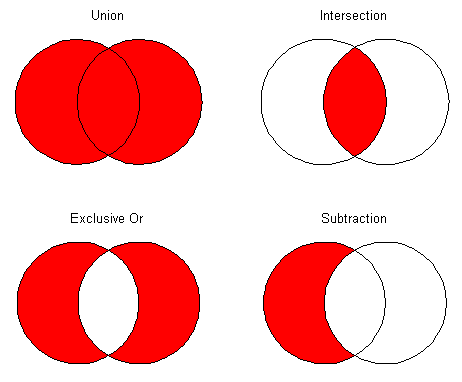
odds = {1, 3, 5}
primes = {2, 3, 5}

print(f"Set A: {odds}")
print(f"Set B: {primes}")
Union (\(\cup\))
# Union - Option 1
union = odds.union(primes)
print(f"Union: {union}")
# Union - Option 2
union = odds | primes
print(f"Union: {union}")Intersection (\(\cap\))
# Intersection - Option 1
inters = odds.intersection(primes)
print(f"Intersection: {inters}")
# Intersection - Option 2
inters = odds & primes
print(f"Intersection: {inters}")Symetric difference (\(\triangle\)) or exclusive OR
# Exclusive OR - Option 1
exclusive = odds.symmetric_difference(primes)
print(f"Exclusive OR: {exclusive}")
# Exclusive OR - Option 2
exclusive = odds ^ primes
print(f"Exclusive OR: {exclusive}")Difference (\(\setminus\)) or substraction
# Substraction - Option 1
substraction = odds.difference(primes)
print(f"Substraction: {substraction}")
# Substraction - Option 2
substraction = odds - primes
print(f"Substraction: {substraction}")
Exercise
: You are going to have a party at your house and you asked three friends to give you a list of people to invite.
You want to do the following:
- Get the total list of guests considering everyone proposed.
- Find the guests common to all of your friends.
- See the “exclusive” guests that each of your friends has.
Create a python program to do that for you.
#Program to decide whom to invite to your party
guest_set1 = {"Alice", "Emma", "Charlie", "David", "Louis"}
guest_set2 = {"Charlie", "David", "Emma", "Frank", "Juan"}
guest_set3 = {"David", "Emma", "Alice", "Helen", "Julia"}

#Union
total_set = guest_set1 | guest_set2 | guest_set3
common_guests = guest_set1 & guest_set2 & guest_set3
exclusive1 = guest_set1 - (guest_set2 | guest_set3)
exclusive2 = guest_set2 - (guest_set1 | guest_set3)
exclusive3 = guest_set3 - (guest_set1 | guest_set1)

print(f"Total guests list: {total_set}")
print(f"Common guests: {common_guests}")
print(f"Exclusive guests of friend 1: {exclusive1}")
print(f"Exclusive guests of friend 2: {exclusive2}")
print(f"Exclusive guests of friend 3: {exclusive3}")
Exercise
Exercise: What is wrong with the following code?
#Program to get the difference between two sets
set1 = {0, 1, 2, 2, [0,0]}
set2 = {1.0, 3.14, (0,0), 2}

difference = set1 - set2
print(difference)
Answer: You cannot have a set of lists.
Exercise
Exercise: What is wrong with the following code?
#Program to modify a set
set1 = {0, 1, 2, 2, 4}

for element in range(len(set1)):
  set1[element] += 1

print(set1)
Answer: You cannot access specific elements of a set. You could do that using list comprehension. Alternative below:
#Program to modify a set
set1 = {0, 1, 2, 2, 4}

new_set = {element + 1 for element in set1}
print(new_set)
Exercise
Exercise: Fix the code to get repeated words in both sets regardless of whether they are uppercase or lowercase.
set1 = {"TABle", "DOOR", "chain", "wire"}
set2 = {"pencil", "door", "taBle", "word"}

#Intersection
set3 = set1 & set2

print(set3)
#Create two new empty sets
new_set1 = set()
new_set2 = set()
#Put each word in lowercase
new_set1 = {element.lower() for element in set1}
new_set2 = {element.lower() for element in set2}
#Intersection
new_set3 = new_set1 & new_set2
print(new_set3)Convert between Lists, Tuples and Sets
# Define a list
ls_numbers = [1, 2, 2, 3]

print(f"List: {ls_numbers}")
print(f"Type: {type(ls_numbers)}")
# Define a list
ls_numbers = [1, 2, 2, 3]
# Convert list to tuple
tp_numbers = tuple(ls_numbers)
print(f"Tuple: {tp_numbers}")
print(f"Type: {type(tp_numbers)}")# Define a list
ls_numbers = [1, 2, 2, 3]
# Convert list to set
set_numbers = set(tp_numbers)
# Duplicated elements are removed!
print(f"Set: {set_numbers}")
print(f"Type: {type(set_numbers)}")
Exercise
: You are at home with your friends and it’s time to choose a movie to watch, but you always take too long.
You decide to create a function in Python for this. Each friend has a list of movies they would like to watch, and your function should return the movies that are common to all of them.
#Program to choose a movie
friend1 = ["Inception", "The Matrix", "Inception", "Interstellar", "Avatar"]
friend2 = ["The Godfather", "Gladiator", "Interstellar", "Titanic", "The Lord of the Rings"]
friend3 = ["Interstellar", "Saving Private Ryan", "Toy Story", "The Dark Knight", "Back to the Future"]
friend4 = ["Interstellar", "Jurassic Park", "Star Wars", "Forrest Gump", "The Avengers"]

def choose_movie(friend1, friend2, friend3, friend4):
  #Remove duplicate elements from lists
  friend1 = set(friend1)
  friend2 = set(friend2)
  friend3 = set(friend3)
  friend4 = set(friend4)

  #Use intersection to choose the movie
  movie = list(friend1 & friend2 & friend3 & friend4)

  return movie

print(choose_movie(friend1, friend2, friend3, friend4))
Create another function to store in a list all the proposed movies.
#Function to store all proposed movies
def store_movies(friend1, friend2, friend3, friend4):
  #Remove duplicate elements from lists
  friend1 = set(friend1)
  friend2 = set(friend2)
  friend3 = set(friend3)
  friend4 = set(friend4)

  #Use union to store all movie
  movies = list(friend1 | friend2 | friend3 | friend4)

  return movies

print(store_movies(friend1, friend2, friend3, friend4))
Practice some more exercises here!
Summary
| Data Structure | Ordered | Mutable | Duplication |
|---|---|---|---|
| List | ✅ | ✅ | ✅ |
| Tuple | ✅ | ❌ | ✅ |
| Set | ❌ | ✅ | ❌ |