Writing and Running Scripts
Module 4: IDEs & Tools
Notebooks and scripts
A Python script is a text file with the extension .py that contains Python code. Compared with a notebook:
Notebook (.ipynb) |
Script (.py) |
|
|---|---|---|
| Structure | Cells that you run one by one | One program that runs top to bottom |
| Output | Shown below each cell | Shown in the terminal |
| Best for | Exploring, learning, reports | Larger projects, automation, reusable code |
| Reusable from other files | Difficult | Yes, with import |
Notebooks are great for exploring. When your code grows, or you want to reuse it, move it to a script.
Your first script
- In VS Code, open your course folder (File > Open Folder…).
- Create a new file named
hello.py. - A script usually has three parts, in this order: imports, functions, main code.
import random


def greet(name):
    """Return a greeting for the given name."""
    return f"Hello, {name}!"


name = "BAM"
print(greet(name))
print("Lucky number:", random.randint(1, 9))- Run it with the Run Python File button (the triangle at the top right), or in a terminal:
python hello.pyThe terminal must be in the same folder as the file. In VS Code, the integrated terminal opens in the folder you have open.
Execution order
Python runs a script from the first line to the last. Functions are only defined when Python reads the def; their code runs only when you call them.
print("1. start")

def say_hello():
    print("3. inside the function")

print("2. after the definition")
say_hello()
print("4. end")
The numbers show the order in which the messages appear.
The main function
When we put a script in a file, we usually write the code that does the work inside a function called main, and we call it at the end:
def compute_square(x):
    return x ** 2


def main():
    print(compute_square(7))


if __name__ == "__main__":
    main()
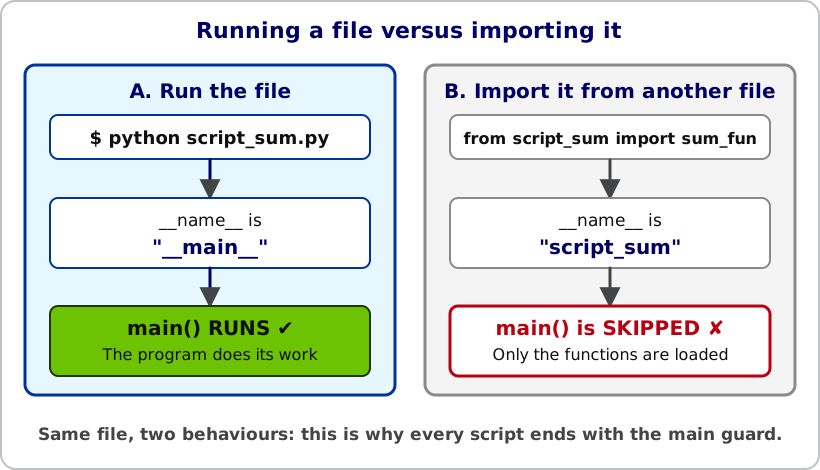
What does if __name__ == "__main__": mean?
- Python gives every file a special variable called
__name__. - If you run the file directly (
python script.py),__name__is equal to"__main__", so the code inside theifruns. - If another file imports this one,
__name__is the name of the file, so the code inside theifis skipped.
This lets the same file work as a program and as a collection of functions that other files can import.
Getting input from the user
The input() function pauses the script and waits for the user to type text in the terminal. It always returns a string:
text = input("Enter some numbers separated by spaces: ")
numbers = [float(x) for x in text.split()]
print(numbers)
Typing 2 4 4 4 gives [2.0, 4.0, 4.0, 4.0]. Here split() cuts the string at the spaces and float() converts each piece to a number.
Importing functions from another script
You can reuse functions from one script in another. Suppose we have two files in the same folder:
# script_sum.py
def sum_fun(a, b):
    return a + b


def main():
    print(sum_fun(2, 3))


if __name__ == "__main__":
    main()
# script_calc.py
from script_sum import sum_fun
def diff_fun(a, b):
return a - b
def main():
print(sum_fun(10, 4))
print(diff_fun(10, 4))
if __name__ == "__main__":
main()To import several functions from the same file:
from script_sum import sum_fun, another_function- The script you import from must be in the folder you are working in (or in a folder Python can find).
- Do not include the
.pyin the import: writefrom script_sum import sum_fun, notfrom script_sum.py import sum_fun. - Because of
if __name__ == "__main__":, importingscript_sumdoes not run itsmain().
Practice
When something fails, read the error message first. If you need a reminder of debugging techniques, try the Debugging Questions.
Do the Guessing Game as a script guessing_game.py. Import the random library to generate the number. The game must end when the user guesses the number or types exit, and then print the number of guesses.
Save this as guessing_game.py and run it with python guessing_game.py:
import random


def guessing_game():
    number = random.randint(1, 9)   # both ends are included
    guesses = 0

    while True:
        guess = input("Guess a number between 1 and 9, or type 'exit': ")

        if guess.lower() == "exit":
            break

        guess = int(guess)
        guesses += 1

        if guess < number:
            print("Too low!")
        elif guess > number:
            print("Too high!")
        else:
            print("Exactly right!")
            break

    print(f"Game over. You took {guesses} guesses.")


def main():
    guessing_game()


if __name__ == "__main__":
    main()
random.randint(a, b) includes both limits, so random.randint(1, 9) can return 9. Compare with np.random.randint(1, 10), where the upper limit is excluded. If the user types something that is not a number or exit, int(guess) raises a ValueError: you can handle it with try / except ValueError.
Write a script std.py with two functions:
compute_stdcalculates the standard deviation of a list of numbers.mainasks the user to type some numbers separated by spaces, then computes and prints their standard deviation.
Use input() to read from the terminal.
import math


def compute_std(numbers):
    """Return the (population) standard deviation of a list of numbers."""
    n = len(numbers)
    mean = sum(numbers) / n
    variance = sum((x - mean) ** 2 for x in numbers) / n
    return math.sqrt(variance)


def main():
    text = input("Enter some numbers separated by spaces: ")
    numbers = [float(x) for x in text.split()]
    print(f"Standard deviation: {compute_std(numbers)}")


if __name__ == "__main__":
    main()
For the input 2 4 4 4 5 5 7 9 the result is 2.0.
Write a script mean_std.py with two functions:
compute_meancalculates the mean of a list of numbers.mainasks the user for numbers and prints their mean and standard deviation.
Do not copy compute_std: import it from std.py.
from std import compute_std


def compute_mean(numbers):
    """Return the mean of a list of numbers."""
    return sum(numbers) / len(numbers)


def main():
    text = input("Enter some numbers separated by spaces: ")
    numbers = [float(x) for x in text.split()]
    print(f"Mean: {compute_mean(numbers)}")
    print(f"Standard deviation: {compute_std(numbers)}")


if __name__ == "__main__":
    main()
Both files must be in the same folder. Thanks to the main guard, importing std does not ask for numbers twice.
The centipede game starts with a pot of money and is played by two players. On their turn, a player can either take the money, or pass the turn to the other player, in which case the pot doubles. The game ends when one player takes the money.
Write a script centipede.py to play against the computer:
- The pot starts at 1 EUR and the first player is chosen at random.
- When it is the computer’s turn, it passes with a probability of \(100 \cdot (1/\text{pot})^{1/3}\ \%\) and takes the money otherwise.
- Play several times. How much money can you get?
import random


def computer_passes(amount):
    """The computer passes with probability (1 / amount) ** (1 / 3)."""
    probability = (1 / amount) ** (1 / 3)
    return random.random() < probability


def play():
    amount = 1
    player_turn = random.choice([True, False])
    while True:
        if player_turn:
            choice = input(f"Your turn. Pot: {amount} EUR. Take or pass? ").strip().lower()
            if choice == "take":
                print(f"You take {amount} EUR!")
                return amount
            amount *= 2
        else:
            if computer_passes(amount):
                print(f"The computer passes. Pot: {amount * 2} EUR")
                amount *= 2
            else:
                print(f"The computer takes {amount} EUR. You get nothing.")
                return 0
        player_turn = not player_turn


if __name__ == "__main__":
    play()
Need Help?
If you have any questions, feel free to reach out via email at dprecioso@faculty.ie.edu