events = [
    ("Athletics", "Olympic Stadium", "10:00", 35.00),
    ("Swimming", "Aquatics Centre", "12:00", 30.00),
    ("Basketball", "Indoor Arena", "16:00", 40.00),
    ("Tennis", "Central Court", "18:00", 45.00),
    ("Gymnastics", "Gymnastics Arena", "20:00", 38.00)
]Ticket Booking System
Side Project for Extra Credit
Build a small booking system for the Olympic Games. Fans choose one of five events, inspect the venue’s seating plan, and book or cancel a seat. Every booking must reserve the right seat, and every cancellation must free it again so another fan can take it.
Main concepts: tuples, nested lists, string formatting, updating lists in place, and a menu-driven program.
The data
Each event is a tuple (sport, venue, starting_time, price). An event’s position in events is its event index.
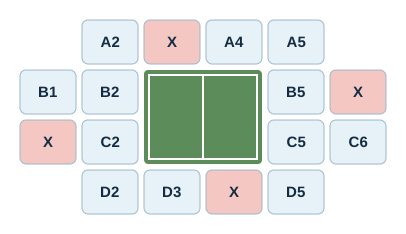
Each venue has its own seating plan: a list of rows, where each row is a list of strings.
- A seat code such as
"A3"is an available seat. "X"is an occupied seat."--"is an empty space with no seat. It must never be booked.
athletics_seats = [
    ["A1", "A2", "A3", "A4", "A5", "A6", "A7", "A8"],
    ["B1", "B2", "B3", "B4", "B5", "B6", "B7", "B8"],
    ["C1", "C2", "C3", "C4", "C5", "C6", "C7", "C8"],
    ["D1", "D2", "D3", "D4", "D5", "D6", "D7", "D8"]
]

swimming_seats = [
    ["A1", "A2", "A3", "A4", "A5", "A6"],
    ["--", "--", "--", "--", "--", "--"],
    ["B1", "B2", "B3", "B4", "B5", "B6"]
]

basketball_seats = [
    ["A1", "A2", "A3", "A4", "A5", "A6"],
    ["B1", "B2", "--", "--", "B5", "B6"],
    ["C1", "C2", "--", "--", "C5", "C6"],
    ["D1", "D2", "D3", "D4", "D5", "D6"]
]

tennis_seats = [
    ["--", "A2", "A3", "A4", "A5", "--"],
    ["B1", "B2", "--", "--", "B5", "B6"],
    ["C1", "C2", "--", "--", "C5", "C6"],
    ["--", "D2", "D3", "D4", "D5", "--"]
]

gymnastics_seats = [
    ["A1", "A2", "A3", "A4", "A5"],
    ["B1", "B2", "B3", "B4", "B5"],
    ["C1", "C2", "C3", "C4", "C5"],
    ["D1", "D2", "D3", "D4", "D5"]
]

# seat_plans[i] is the seating plan of events[i].
seat_plans = [
    athletics_seats,
    swimming_seats,
    basketball_seats,
    tennis_seats,
    gymnastics_seats
]

bookings = []
bookings stores one tuple per successful booking:
(customer_name, event_index, seat_code, row, col, price)For example, ("Marta", 2, "D4", 3, 3, 40.00) is Marta’s booking of seat D4 at the basketball game.
The seating plans and bookings are lists, so your functions can change them in place without the global keyword. Review the Python Scope and Mutability lessons if this is unclear.
Step 1: List the events
Create show_events(events). Return a single string with one numbered line per event, showing its sport, venue, time, and price.
1. Athletics  | Olympic Stadium  | 10:00 | €35.00
2. Swimming   | Aquatics Centre  | 12:00 | €30.00
...
Use enumerate() to number the events, and f-strings to format each line. Join the lines with "\n". Aligning the columns is optional; the format specifier {sport:<10} pads a string to ten characters.
Return the string rather than printing it, so the menu in Step 7 decides when to print.
Step 2: Display a seating plan
Create show_seating_plan(seat_plan). Return a single string with one line per row, separating the seats with spaces.
A1 A2 A3 A4 A5 A6
B1 B2 -- -- B5 B6
C1 C2 -- -- C5 C6
D1 D2 D3 D4 D5 D6
Step 3: Find a seat
Create find_seat(seat_plan, seat_code).
- Convert the seat code to uppercase, so
"a3"and"A3"are treated equally. - Loop over the rows and seats, keeping track of their indices.
- If the seat is found, return
(row, col). - Otherwise, return
(-1, -1).
find_seat(athletics_seats, "A3")  # (0, 2)
find_seat(athletics_seats, "c8")  # (2, 7)
find_seat(athletics_seats, "Z9")  # (-1, -1)
An occupied seat shows "X", so its original code is no longer in the plan: find_seat() will not find a seat that has already been booked. This is why each booking stores the seat’s indices.
Step 4: Book a seat
Create book_seat(customer_name, event_index, seat_code). It uses events, seat_plans, and bookings from the data cell.
- If
event_indexis not a valid index ofevents, returnFalse. - Find the seat in the event’s seating plan. If it is not found, return
False. - Replace the seat code with
"X"in the seating plan. - Append the booking tuple to
bookings, using the uppercase seat code and the event’s price. - Return
True.
Be careful: "X" and "--" appear in the seating plans, so find_seat() can find them. Booking either must return False and leave everything unchanged.
book_seat("Marta", 2, "d4")  # True: seat D4 at the basketball game.
book_seat("Marta", 2, "D4")  # False: already booked.
book_seat("Marta", 2, "C4")  # False: that position is "--".
book_seat("Marta", 7, "A1")  # False: there is no event 7.
Negative numbers are valid list indices in Python, but not valid event indices here.
Step 5: Cancel a booking
Create cancel_booking(customer_name, event_index, seat_code).
- Find the booking with this customer name, event index, and seat code. Treat the seat code case-insensitively, as in Step 3.
- Restore the seat code in the event’s seating plan, using the stored row and column.
- Remove the booking tuple from
bookings. - Return
True, orFalseif no matching booking exists.
Removing items from a list while looping over it can skip elements. Once you have removed the matching booking, return immediately.
After a cancellation, the seat must be available again: book_seat() should accept it.
Step 6: Summarize the bookings
Create two helper functions for the menu:
customer_bookings(customer_name)returns the list of booking tuples that belong to that customer.total_revenue()returns the sum of the prices of all bookings.
Step 8: Test your program
Test your functions directly before testing the menu. Run the data cell again before each group of tests, so earlier bookings do not affect later results.
Check that:
- Each event displays the correct seating layout for its venue.
find_seat()returns the right indices, ignores case, and returns(-1, -1)for a nonexistent seat.- A valid booking changes the correct seat to
"X"and stores the correct tuple. - Booking the same seat twice, a
"--"position,"X", a nonexistent seat, or an invalid event index returnsFalseand changes nothing. - Booking
"A1"for Athletics does not change"A1"in any other venue. - A cancellation restores the original seat code, removes the booking, and lets the seat be booked again.
- Cancelling a nonexistent booking returns
Falsewithout crashing. customer_bookings()andtotal_revenue()return the expected results after several bookings and cancellations.- In the menu, every option runs the correct operation, invalid input is handled safely, and only option 8 ends the program.
Stretch goals (optional)
- Available seats: show how many seats remain available for each event.
- Row-based pricing: charge different prices depending on the row of the seat.
- Discounts: apply a discount when a customer books tickets for three or more events.
- Waiting list: let customers join a waiting list when an event is full, and give them the seat when someone cancels.
Document any extension you implement and add tests for it.
Before you submit
Upload your completed notebook to the Side Projects section on Blackboard before the final exam.
Include your functions, your tests with saved outputs, and an example session of the menu. Explain why each booking stores the row and column of its seat. Follow the notebook and AI-use guidance on the Side Projects page.